Removing a Content Page
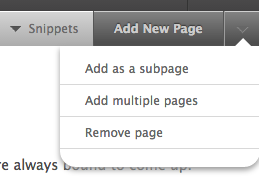
You can remove a page by clicking on the page you want removed, and then clicking the drop down arrow next to the “Add New Page” button in the top right menu bar. Select “Remove Page” from the drop down options.
Please Note: After you agree to the pop-up confirmation, the page will be removed. Be careful when removing pages; all sub-pages will be removed as well and there is no way for us to get your content back once you delete it.